



Creación de aplicaciones impulsadas por IA: guía paso a paso para crear aplicaciones más rápido
Se puede decir con seguridad que la creación de aplicaciones impulsadas por IA tiene más sentido en escenarios donde la velocidad, la iteración y el esfuerzo manual reducido son fundamentales. ¿Pero cómo manejarlo? Te damos los pasos.
 Katie Mikova
10 minutos de lectura
Katie Mikova
10 minutos de lectura
En lo que respecta a la IA, los desarrolladores suelen encajar en uno de los bandos: o estás completamente inmerso en su automatización, sus potentes capacidades generativas y sus procesos de desarrollo simplificados, o no lo estás. O sigues dudando en empezar a usarlo o reemplazar por completo los flujos de trabajo y ciclos de desarrollo ya establecidos. Sin embargo, la creación de aplicaciones impulsadas por IA es un hecho. Ya está aquí, y los equipos y empresas que no usan estas tecnologías están siendo cada vez más escasos. Muchos cambios interesantes simplemente siguen ocurriendo, y muchos programadores profesionales están recurriendo al low code y la IA.
Este año, Microsoft y OpenAI profundizaron su colaboración bajo un acuerdo recién firmado, ampliando su visión compartida de "hacer que los beneficios de la IA sean ampliamente accesibles".
- Como parte de este esfuerzo, Microsoft ha lanzado herramientas que incorporan GenAI, modelos de razonamiento y automatización a los flujos de trabajo cotidianos.
- Dentro de Microsoft, los equipos han empezado a utilizar la IA generativa para transformar la forma en que diseñan productos y gestionan proyectos, aumentando la eficiencia y replanteando los flujos de trabajo tradicionales.
Por ejemplo, las organizaciones que utilizan los servicios de IA de Microsoft Azure han creado "agentes de IA" internos que actúan como ayudantes. En algunos casos, esto se ha convertido en una forma eficiente de reducir tareas tediosas (como la búsqueda manual de datos o la recuperación interna de conocimiento) y de acelerar operaciones complejas, como los ciclos de desarrollo de productos.
Pero, ¿qué más hay en el mundo de la innovación en IA? ¿Por qué y cómo deberías crear aplicaciones con IA? ¿Y cómo pueden herramientas como nuestra App Builder facilitar trabajos repetitivos de interfaz, acelerar prototipos, permitir contribuciones no técnicas y, simplemente, demostrar el valor de la IA?
¿Qué es la creación de aplicaciones impulsada por IA?
Nos hemos dado cuenta de que, como su nombre indica, la creación de aplicaciones impulsadas por IA es el proceso de aprovechar herramientas y automatización GenAI para diseñar aplicaciones, estructurar y generar software. Esta es la forma más sencilla de explicarlo. Es una forma de evitar la programación manual que ayuda, acelera y automatiza partes de los flujos de trabajo del desarrollo de aplicaciones.
Durante una de las conferencias y eventos tecnológicos más interesantes de Europa este año, ISTA 2025 en Bulgaria, tuve la oportunidad de asistir a varios paneles y escuchar a líderes del sector, innovadores y emprendedores hablar sobre temas relevantes relacionados con la IA. Como puedes imaginar, la creación de aplicaciones impulsadas por IA fue una de las discusiones más candentes y controvertidas.
Las conversaciones sobre "IA para la UI", "La ventaja de la IA: Midiendo el aumento de la productividad en la ingeniería", "Aumento o reemplazo: impacto de la IA en los directivos senior" y otras dibujaron un panorama claro: aunque la IA está abriendo oportunidades extraordinarias para la velocidad, la automatización y la creatividad, también está desafiando prácticas de desarrollo consolidadas y remodelando lo que los equipos esperan de las herramientas que utilizan.
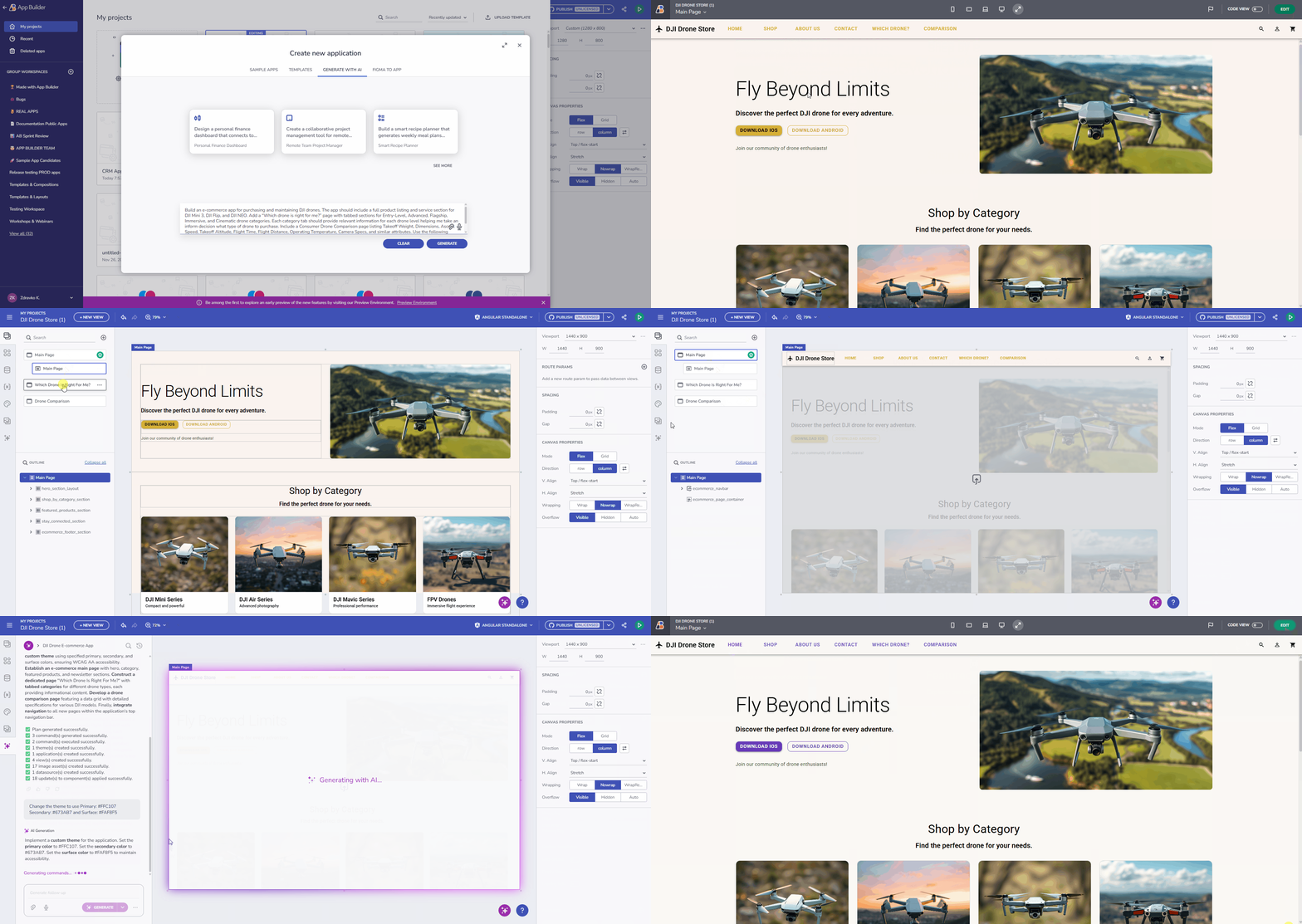
Pero, ¿cómo es el proceso de creación de aplicaciones de IA? El ciclo de diseño a código de IA suele implicar los siguientes pasos:
- Proporcionar un prompt inicial, descriptivo, detallado y en lenguaje natural.
- Generar el diseño inicial: pantallas, componentes, estructura básica de la aplicación.
- Refinando la interfaz usando correcciones conversacionales e instrucciones adicionales, reajustando la salida.
- Añadir datos y vincularlos a elementos de la interfaz – conectar APIs, JSON de ejemplo, conjuntos de datos, gráficos, etc.
- Optimización automática y aplicación de reglas del sistema de diseño por el propio creador de UI de IA.
- Generar código limpio y listo para producción (cuando se usa App Builder, esto estará disponible para Angular, React, Blazor y Web Components).
- Iterar y mejorar la aplicación.
Con todo esto, podemos ver claramente las ventajas que presenta el actual panorama del desarrollo de aplicaciones. Lo que nos lleva a la siguiente pregunta.
¿Cuáles son los beneficios de construir aplicaciones impulsadas por IA?

En lugar de empezar desde cero con un lienzo en blanco, la construcción de aplicaciones impulsada por IA proporciona el andamiaje para que puedas avanzar desde ahí y refinar la base o el prototipo. Esto no solo ahorra tiempo, sino que puede eliminar cuellos de botella como prototipos más lentos y a ritmo humano, acumulaciones desordenadas, diseños o pantallas de edificios, andamios que llevan semanas, y así sucesivamente.
Además, cuando decides crear aplicaciones con IA, también te beneficias de:
- Mejorar la coherencia del diseño (la IA trabaja con los sistemas de diseño existentes).
- Reducir tareas de desarrollo repetitivas.
- Miembros del equipo no técnicos que pueden contribuir libremente a la planificación de la UI.
- Convertir ideas en lenguaje natural en pantallas tangibles.
- Acortando la brecha entre la idea → prototipo → ciclo de código listo para producción.
Estos son los beneficios de alto nivel y las ventajas orientadas al usuario. A nivel técnico y entre bastidores, la creación de aplicaciones impulsadas por IA se puede gracias a varias capacidades principales:
- Comprensión del Lenguaje Natural (NLU) para interpretar prompts y convertir intenciones de alto nivel en construcciones accionables de interfaz y código.
- Modelos generativos (LLMs y modelos de lenguaje de visión) que sintetizan diseños, componentes y estructuras de datos basándose en sistemas de diseño establecidos y patrones de buenas prácticas.
- Canalizaciones de diseño a código que mapean las interfaces generadas en HTML limpio, CSS y código específico o agnóstico del framework.
- Motores de diseño automatizados que aplican reglas responsivas, restricciones de espaciado y jerarquías de componentes sin hacerlo manualmente.
- Análisis semántico para mantener la coherencia entre pantallas, hacer cumplir los tokens de diseño y alinearse con los estándares accesibles de UX.
- Refinamiento adaptativo, donde ajustas el diseño, el estilo, los componentes o las fuentes de datos mediante comandos conversacionales sencillos en tiempo real.
Para ayudarte a entender cómo funciona todo esto, pasemos a la parte práctica y al núcleo de nuestra guía.
Guía paso a paso: Cómo construir una aplicación usando IA
En esta parte, te mostraremos cómo utilizar nuestro App Builder low-code y sus funciones impulsadas por IA para generar tu aplicación llena de funciones y lista para producción.
Paso 1: Define tu aplicación en lenguaje sencillo
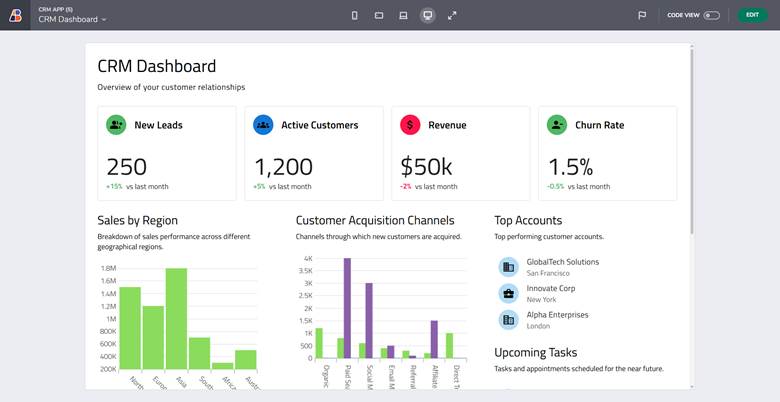
Explica la idea como un prompt: Por ejemplo, puedes especificar lo siguiente: "Crea una vista de panel CRM usando la plantilla "Página del Panel", añadiendo una sección de cabecera y una sección de métricas de panel con cuatro tarjetas métricas para leads, clientes activos, ingresos y abandono. Incluye una sección de estadísticas en el panel con gráficos de categorías, una cuadrícula de datos y una estructura de contenido relevante."
Paso 2: Generar el diseño de la aplicación con IA
Aquí puedes esperar encontrar navegación sugerida, pantallas generadas automáticamente, componentes de interfaz preseleccionados como cuadrículas de datos, gráficos y otros indicadores, y marcadores básicos de datos.
Paso 3: Editar y refinar la interfaz con comandos de IA
Aunque la IA te acerca mucho al diseño deseado, ninguna aplicación generada automáticamente es la opción perfecta a la primera. Por eso el refinamiento es una parte natural del proceso. Con comandos conversacionales, puedes ajustar diseños, cambiar componentes, reorganizar secciones, cambiar temas a oscuro/claro o afinar el estilo hasta que las pantallas se vean exactamente como imaginaste.
Paso 4: Añadir datos y vincularlos (opcional pero esencial)
App Builder AI entiende y genera datos reales y funcionales a partir de descripciones de texto natural. Crea automáticamente fuentes de datos, genera JSON, detecta esquemas y vincula datos a componentes sin necesidad de configuración manual. También mapea campos y configura los bindings de forma inteligente, asegurando que todo funcione desde el primer momento.
Paso 5: Exportar código utilizable
Una vez finalizado el diseño y la interfaz de tu aplicación, App Builder te permite exportar código limpio y listo para producción con un solo clic. Esto incluye:
- HTML/CSS – Exporta marcado y estilo totalmente estructurados que reflejen tu sistema de diseño, reglas de espaciado y configuraciones de diseño responsivas.
- Angular / React / Blazor / Web Components–App Builder genera código específico para el framework adaptado a tu pila tecnológica elegida. Esto significa que puedes integrar inmediatamente la salida en tu aplicación existente, continuar el desarrollo o entregarla a tu equipo de ingeniería para su ampliación.
Tras bambalinas, la IA de App Builder garantiza que la salida generada siga una estructura semántica limpia. Los componentes están correctamente anidados, los estilos se aplican de forma consistente y el código sigue las mejores prácticas. De este modo, no tienes que perder tiempo reescribiendo o relimpiando código estándar. En cambio, puedes partir de una base sólida y sostenible que acelere la transición de prototipo a aplicación lista para producción en un marco de tu elección.
Sin embargo, hay algo muy importante que recordar.
Mejores prácticas para sacar el máximo partido a los desarrolladores de aplicaciones con IA
A continuación, hemos detallado varias mejores prácticas probadas que ayudan a los equipos a maximizar el valor de la creación de aplicaciones impulsadas por IA. El objetivo, al fin y al cabo, es que tus prompts, flujos de trabajo y decisiones de diseño se traduzcan en resultados de mayor calidad.
- Utiliza indicaciones claras y descriptivas.
- Trabaja pantalla por pantalla mientras refinas.
- Iterar rápidamente usando ediciones conversacionales.
- Combina diseño manual + ajustes de IA para obtener los mejores resultados.
Para demostrar lo que hemos construido usando App Builder y sus capacidades impulsadas por IA, aquí tienes algunos ejemplos de aplicaciones:
- Paneles: Panel de Reportes, Panel de Recursos Humanos, App de Gestión de Equipos
- Aplicaciones CRUD: Aplicación CRM
- Portales de administración: Aplicación de gestión del aprendizaje
- Distribuciones de comercio electrónico: Taller de automóviles
- Interfaces con muchos datos: App de gestión de inventario
Explóralos, descárgalos e inspecciona el código. Mira cómo funciona todo.
Limitaciones: Lo que la IA aún no puede reemplazar
Aunque los desarrolladores de aplicaciones de IA son capaces de acelerar el desarrollo y reducir el trabajo repetitivo, no sustituyen completamente la experiencia humana. Ciertos aspectos del desarrollo de aplicaciones aún dependen de la experiencia humana, la experiencia y la comprensión contextual, especialmente en lo que respecta a decisiones de diseño multinivel, lógica de negocio compleja y garantizar una experiencia de usuario accesible y de alta calidad. La IA puede generar un punto de partida sólido, pero la supervisión humana sigue siendo esencial para perfeccionar y validar el producto final. Podemos resumir las limitaciones así:
- La IA no sustituye al pensamiento UX.
- Gestionar la lógica de negocio sigue requiriendo humanos.
- La accesibilidad y la optimización del rendimiento necesitan revisión manual.
- Las sugerencias de IA pueden requerir ajustes para aplicaciones de nivel empresarial.
- Las salidas no siempre son perfectas.
Como destaca Zdravko Kolev, Director de Desarrollo de Producto en Infraestructuras:
"Las personas que afirman que la IA produce resultados impecables cada vez están o bien mal informadas o no son honestas. La IA es increíblemente valiosa, pero el éxito depende de entender sus imperfecciones y abordarla con la mentalidad adecuada. Algunos resultados serán pobres antes de ser excelentes, y los usuarios tendrán que experimentar, iterar y refinarlos varias veces. Dependo de múltiples herramientas de IA a diario tanto para el trabajo como para el uso personal, y siempre recuerdo a los demás que esta es la realidad actual, no solo en un producto, sino en todos los sistemas de IA. Las expectativas de perfección mágica a partir de un solo prompt son poco realistas. Aún no hemos llegado a ese punto, y la IA tampoco."
Su punto de vista está lejos de ser aislado. Recientemente me encontré con un artículo sobre cuellos de botella en IA, y un ejemplo en particular me llamó la atención;
"Todo sistema tiene un cuello de botella. Hace un siglo, los automóviles se fabricaban a mano, uno a uno, así que el cuello de botella para los posibles propietarios era encontrar artesanos locales con conocimientos expertos y kits personalizados. El cambio a las líneas de montaje eliminó ese cuello de botella... Pero gestionar equipos de ensambladores se convirtió en el siguiente cuello de botella. Sustituir a algunos humanos por robots (para remachar paneles de coches y pintar con spray los exteriores) alivió parcialmente el cuello de botella de personal... haciendo que la gestión de materiales y la logística de envío sean los siguientes cuellos de botella. Dicho de otra manera: cuando aceleramos un paso en nuestro proceso mayor, otro paso se convierte en el más lento: la nueva restricción: el cuello de botella."
Así que sí, hay límites para la IA y si quieres profundizar, puedes leer Cuáles son las 5 limitaciones de la IA en el desarrollo de aplicaciones low-code.
Comprender estas limitaciones también te ayuda a decidir cuándo y dónde la construcción de aplicaciones impulsadas por IA aporta más valor.
Envolver…
La IA puede aportar un gran valor cuando se intenta desarrollar software más rápido o permitir que desarrolladores junior o equipos no técnicos formen parte del proceso con el objetivo de simplificarlo. Se puede decir con seguridad que la creación de aplicaciones impulsadas por IA tiene más sentido en escenarios donde la velocidad, la iteración y el esfuerzo manual reducido son fundamentales.
Por ejemplo, esto podría ser situaciones en las que necesitas modernizar una aplicación obsoleta o migrar sistemas heredados; cuando las startups necesitan prototipar rápidamente; equipos de diseño que buscan andamios de interfaz instantánea; desarrolladores que quieran eliminar el trabajo repetitivo de front-end o, como ya se ha mencionado, permitir una colaboración fluida en equipos de fusión y gestores de producto que quieran validar ideas rápidamente.







