共に働くために作られた
App Builder、65+のカスタマイズ可能なIgnite UIコンポーネントを視覚的なドラッグ&ドロップエディターで提供し、次のウェブアプリを最速で構築する方法です。あなたが作るすべてのものは、現代のウェブフレームワーク向けの本番対応コードを生成し、品質を犠牲にすることなく、より速くイノベーションできる完全な所有権と自由を与えます。
デモを予約する App Builderのトライアル
なぜIgnite UIユーザーがApp Builderにアップグレードするのか
すでにIgnite UIコンポーネントを使用しているため、App Builderへの移行はスムーズで、コードから一から始めることなく、より速く直感的に完成したアプリを作成できます。設計と開発をチームが協力できる単一の作業環境に統合し、デザインからコードまでのワークフロー全体のギャップを埋めます。
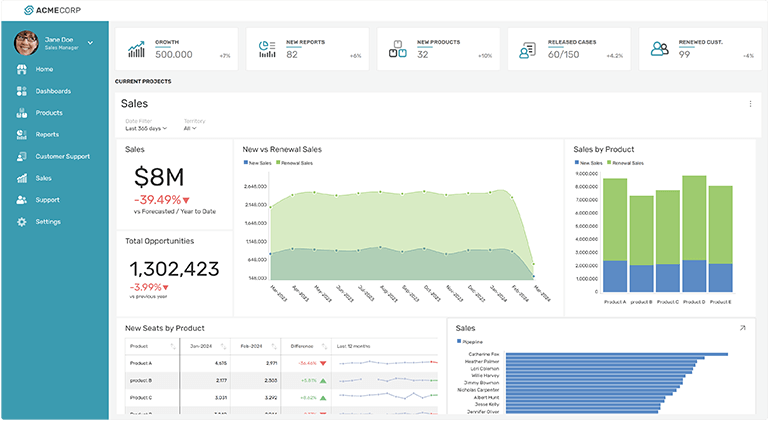
エンタープライズグレードUIを備えたAI生成アプリ
-
AIを使って自然言語からマルチページ構造、ビューポート、ナビゲーション、テーマなど、完全なアプリを生成できます。
-
ダッシュボード、ランディングページ、商品リスト、eコマース、ログイン・登録画面など、完全な画面を作成します。
-
あなたが作るすべてのものは、Ignite UIの高性能グリッドやチャートなどによって機能し、一貫性のある高品質なUIを保証します。

ピクセルパーフェクトでクリーン、使いやすいコード出力
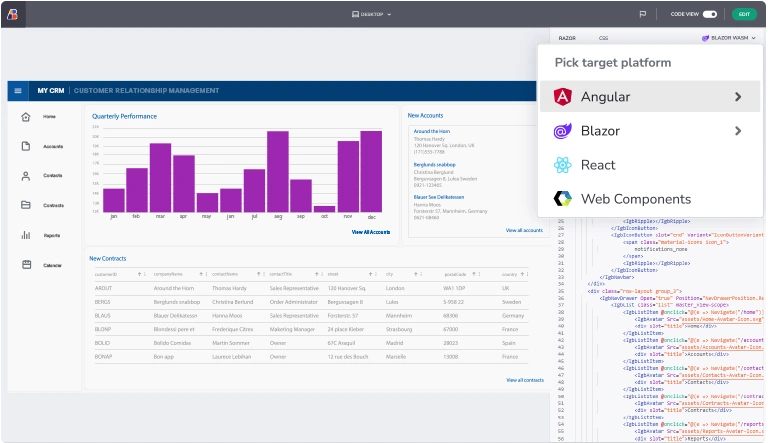
私たちのビジュアルアプリエディターで設計・構築したものは、Angular、React、Web Components、Blazorなどの人気ウェブフレームワーク上で本番対応のコードに生成できます。
ソースコードの所有権を持つことで、長期的な保守性、スケーラビリティ、独立性が保証されます。あなたのアプリは本当にあなたのものであり、所有し、スケールし、進化させられます。
新しい運転
収入
ストリーム
-
コストのかかる遅延やパフォーマンスの問題を防ぎ、開発サイクルを短縮することで、市場シェアを獲得し、顧客の注目を集め、収益機会を活用できます。
-
市場投入コストを削減し、平凡で反復的なタスクを排除し、イノベーションと顧客拡大に予算を再配分します。
-
独自の機能がないため、チームは制限やプラットフォームの制約なしにイノベーション、カスタマイズ、拡張を行うことができます。
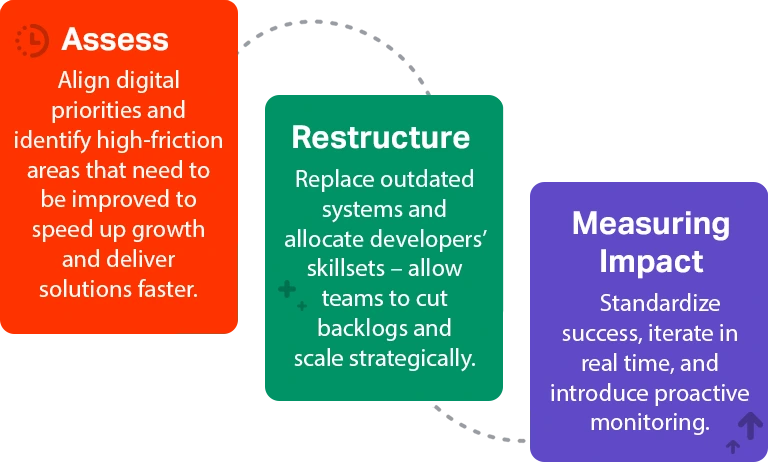
デジタルトランスフォーメーションへの3ステップアプローチ
アプリ開発の向上
Ignite UIは機能満載のエンタープライズコントロールを提供しますが、完全なアプリを作るには手動のレイアウト、配線、コードの反復、設計作業が必要です。App Builderでは、未実装のアプリ開発レイヤーを追加し、サイクルをより良く効率化します。


ベンダーロックインはありません
自動化と雰囲気設計
ハンドオフもありません
次のビルドを加速させましょう
エンタープライズアプリケーション
Creating intuitive applications should be an exciting process of discovery, not an exercise in anxiety. In the past, we watched many of you creatively and cautiously use the ‘Duplicate App’ or ‘Copy to Workspace’ features just to create a manual backup before a major design overhaul. While we always admire our community’s ingenuity, we knew there had to be a better, native way.
Whether you are heavily customizing a complex dashboard, experimenting with new UX layouts, or leveraging AI to auto-generate UI components, you need the freedom to iterate rapidly without the fear of breaking your app.
Today, we are thrilled to introduce a robust Versioning Mechanism to App Builder.
This new feature provides a persistent safety net across your entire workspace, allowing you to capture, browse, and safely restore previous states of your app without data loss.
Before diving into these new functionalities, if this is your first time learning about App Builder, let me quickly share why you should consider it a key tool in the application development process for your organization:
- A visual app builder – the unified platform for C-level executives, enterprise architects, dev team leaders, designers, developers, and stakeholders.
- Cloud-based WYSIWYG drag & drop tool that helps companies design and build complete business apps 80% faster than ever.
- A low-code tool generates production-ready code for Angular, React, Web Components, and Blazor, and converts Figma designs to code.
Why Versioning Matters in a WYSIWYG World
While our session-scoped Undo/Redo is perfect for quick typo fixes, Version History provides a permanent, cross-session timeline of your app’s evolution. As low-code development and AI-assisted design accelerate how quickly you can build, having a structural “save point” is critical.
The new versioning system empowers you to:
- Design with Confidence: Save named checkpoints before testing a risky design overhaul.
- Recover Instantly: Roll back unintended changes instantly, whether made by you or a collaborator.
- Track Your Evolution: View a clear timeline of your application’s lifecycle.
Key Capabilities at a Glance
Our state versioning system efficiently captures your entire App Builder model—including app structure, views, data sources, and your chosen theme—using a lightweight Diff/Delta strategy.
1. Manual Checkpoints for Intentional Saves
Preparing for a major structural change? You can now manually save your app’s state.
- Simply open the app/view context menu and select Save Version.
- Add a custom label (e.g., “Pre-AI UI Generation” or “Stable Dashboard v1”) to easily identify it later.
2. Automatic Snapshots for Peace of Mind
To ensure you never lose your current state when reverting to an older design, App Builder automatically creates a snapshot immediately before you execute a Restore action.
3. Visual Version Browsing
Managing your history is highly visual and intuitive. By clicking Show Version History from the new application name dropdown, a side panel reveals a complete timeline of your work.
- Filter and Group: Quickly find what you need by filtering for My Versions, Named Versions, or grouping by time (e.g., Earlier This Week).
- Take Action: With a single click, you can restore, rename, duplicate, or delete any saved version.
A Smoother Workspace Experience
Alongside Version History, we’ve polished the top-level application menu. You will notice a new, streamlined dropdown menu by clicking your app’s name. From here, you can seamlessly Rename, Duplicate, Copy to Workspace, or access your Version History—all confirmed by clear success toasts without navigating away from your canvas.
Data Retention Under the Hood: To keep your workspace clean, auto-saved versions are retained for 90 days before automatic cleanup. Manually named versions, however, are yours to keep forever and will only be removed if you choose to delete them.
Start Iterating Today
The new Versioning mechanism is live in your App Builder workspace. Jump in, save a checkpoint, and start experimenting with your UI faster and safer than ever before.
For a full breakdown of prerequisites and technical limitations, check out our Official Documentation Link.
Wrapping up
Try the new features today at my.appbuilder.dev
App Builder is a game-changer in the app development process. With its cloud-based visual builder, low-code capabilities, and new features, it’s a must-have tool for any organization. Try it out today! If you need more details, we encourage you to check out our:
To experience everything in the latest App Builder updates, visit your customer portal and get the latest version. As usual, we are always excited to get your feedback and hear what you want to add or recommend. So please email me at zkolev@appbuilder.dev and let me know how we can help you continue delivering value to your customers with Infragistics.